May 15, 2026
Running NVIDIA Lyra 2.0 on RunPod H100
How to set up and run NVIDIA Lyra 2.0 world generation on a RunPod H100 GPU pod using the lyra3d orchestration framework — with example outputs from real inference runs.

NVIDIA Lyra 2.0 is a state-of-the-art generative model for creating immersive 3D world videos from a single image. Given one photo and a text caption, it generates a zoom-in and zoom-out video that explores the scene — building a coherent 3D world around it. We tested it on a RunPod H100 pod using lyra3d, a lightweight orchestration framework that handles the full bootstrap, inference, and result download over SSH.
Results
Both tests used 81 frames per direction at 480×832 resolution on an H100 80GB.
Test 1 — Desert Military Outpost (Zoom In / Zoom Out)
Input image
Lyra 2.0 output — zoom in then zoom out
Caption used: “A cinematic aerial view of a massive futuristic desert military outpost with modular domed buildings, solar panel arrays, glass skyscrapers, pipelines, and military vehicles rising from golden sand dunes under a warm hazy sky.”
Test 2 — Urban Glass Skyscraper (Orbit Horizontal)
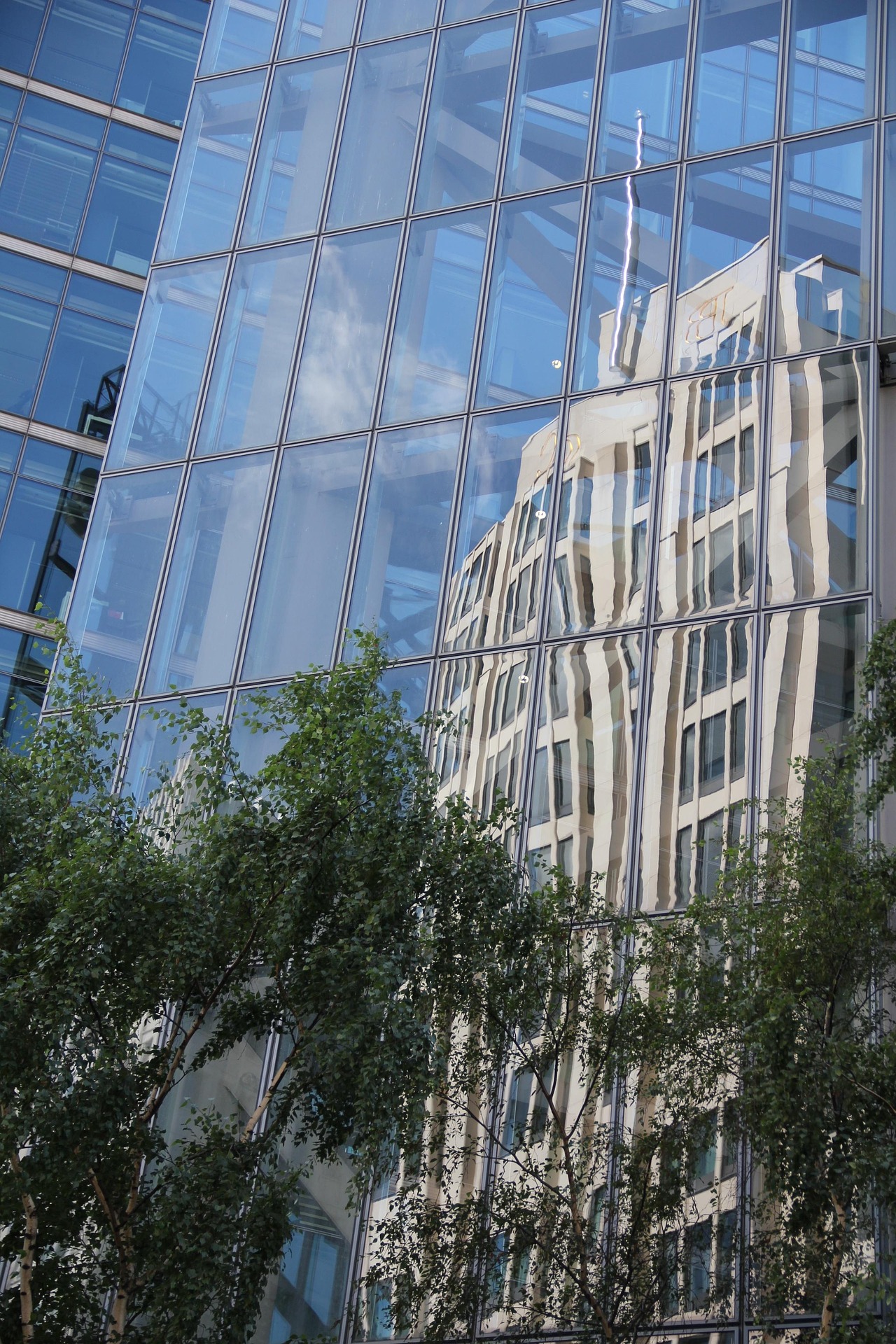
Input image
Lyra 2.0 output — horizontal orbit trajectory
Caption used: “A modern glass curtain wall skyscraper reflecting an ornate classical building, lush green trees in the foreground, urban city scene with bright blue sky.”
Setup Overview
The full setup runs on a fresh RunPod H100 pod with no pre-installed dependencies. The lyra3d bootstrap script handles everything automatically.
1. Launch a RunPod pod
Go to runpod.io and launch a pod:
- GPU: H100 80GB (required — model uses ~75GB VRAM)
- Template: RunPod PyTorch (Ubuntu 24.04, CUDA 12.8)
- Add your SSH public key under Settings → SSH Public Keys
2. Clone lyra3d and configure
git clone https://github.com/tech-microcosm/lyra3d.git
cd lyra3d
cp .env.example .env
# Edit .env with the pod IP and SSH port from the RunPod dashboard
3. Upload and run the bootstrap
# Upload bootstrap script to the pod
scp -i ~/.ssh/id_ed25519 -P <PORT> remote/bootstrap/lyra2_bootstrap.sh root@<IP>:/workspace/lyra3d/

# SSH in and run it in a detached screen session (~38 min on a fresh pod)
ssh -i ~/.ssh/id_ed25519 -p <PORT> root@<IP>
screen -dmS lyra_boot bash /workspace/lyra3d/lyra2_bootstrap.sh
screen -r lyra_boot   # to monitor
4. Place your input and run inference
# Upload your image
scp -P <PORT> my_image.png root@<IP>:/workspace/lyra3d/inputs/

# On the pod: set up sample dir and launch inference
LYRA=/workspace/lyra3d/Lyra/Lyra-2
mkdir -p ${LYRA}/assets/my_sample
cp /workspace/lyra3d/inputs/my_image.png ${LYRA}/assets/my_sample/00.png
echo "Your scene description here." > ${LYRA}/assets/my_sample/00.txt

# Run inference (zoom in + out, minimum valid frame count)
export NVTE_FUSED_ATTN=0
VENV=/workspace/lyra3d/venv
PYTHONPATH=${LYRA} ${VENV}/bin/python -m lyra_2._src.inference.lyra2_zoomgs_inference \
    --input_image_path ${LYRA}/assets/my_sample \
    --sample_id 0 \
    --experiment lyra2 \
    --checkpoint_dir checkpoints/model \
    --prompt_dir ${LYRA}/assets/my_sample \
    --output_path /workspace/lyra3d/outputs/my_run \
    --num_frames_zoom_in 81 \
    --num_frames_zoom_out 81
5. Download results
scp -P <PORT> -r root@<IP>:/workspace/lyra3d/outputs/my_run ./outputs/
Timing (H100 80GB)
| Stage | Time |
|---|---|
| Bootstrap (fresh pod) | ~38 min |
| Checkpoint loading | ~13 min |
| Inference (81 + 81 frames) | ~22 min |
| Total first run | ~73 min |
Subsequent runs on the same pod skip bootstrap and checkpoint loading, bringing inference to ~22 minutes.
Trajectory Options
Lyra supports several camera trajectory modes via --zoom_in_trajectory:
| Mode | Effect |
|---|---|
horizontal_zoom | Default zoom in/out with horizontal drift |
orbit_horizontal | Horizontal orbital sweep around the scene |
orbit_vertical | Vertical orbital arc |
spiral | Inward spiral towards scene center |
spiral_outwards | Outward spiral away from center |
The frame count must satisfy: (frames − 1) must be divisible by 80 — minimum valid value is 81.
Key Notes
NVTE_FUSED_ATTN=0is required to avoid a cuDNN error on H100 with transformer_engine- The model uses ~75GB VRAM — an H100 80GB is the minimum recommended GPU
- Checkpoints are ~40GB and are downloaded once from HuggingFace (
nvidia/Lyra-2.0) - Full source and bootstrap scripts: github.com/tech-microcosm/lyra3d