July 18, 2026
ref-metro: Measure anything with just a credit card and two photos
A web-based stereo measurement tool that lets you measure real-world distances without a ruler — using only a credit card for scale and two smartphone photos taken from different positions.
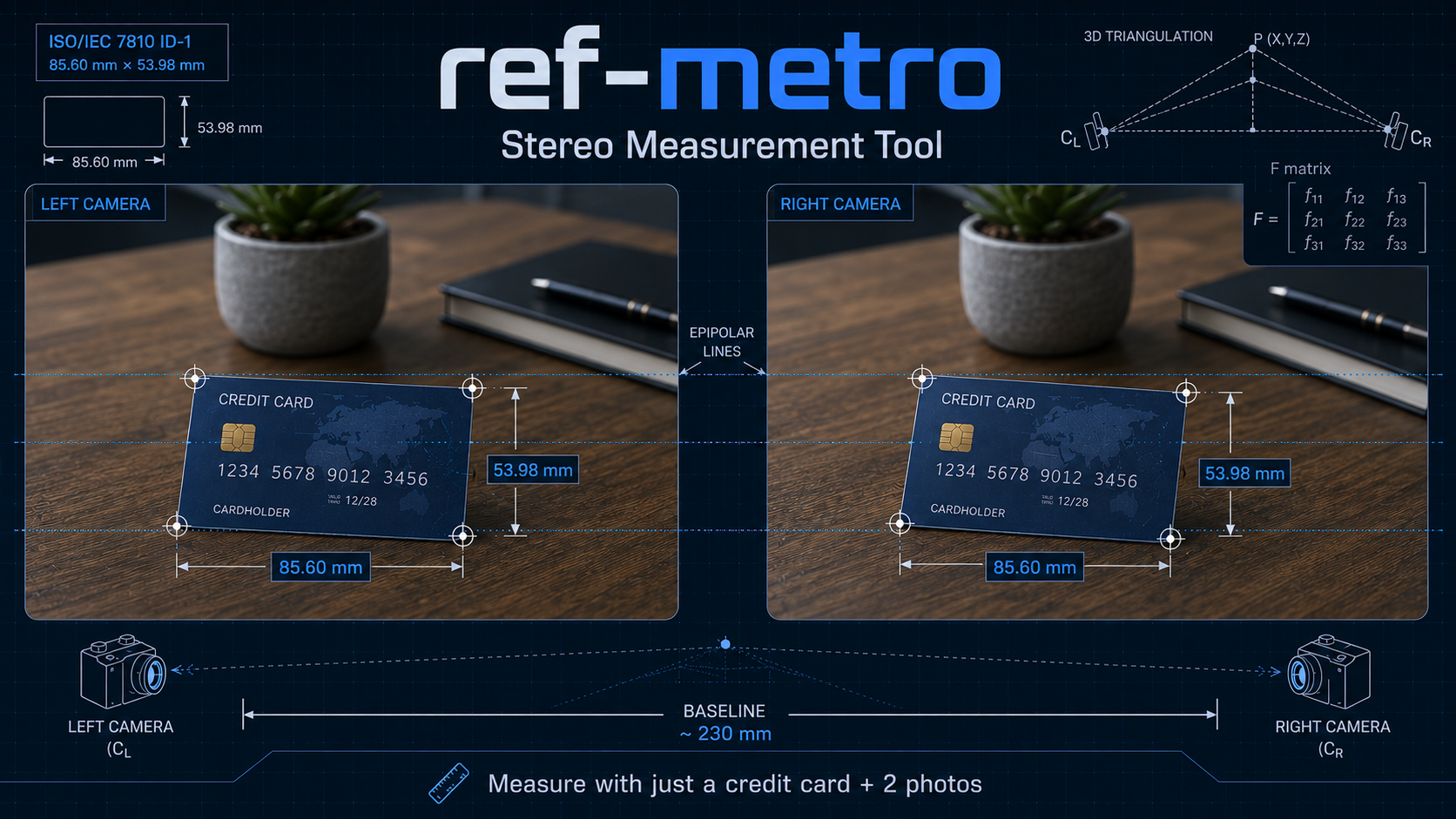
The Problem: How Do You Measure Something When You Don’t Have a Ruler?
You’re shopping for furniture online and need to measure your living room. You’re at a construction site and need to log dimensions of structural elements. You’re comparing product sizes at a store but forgot your tape measure. Or you’re trying to measure an outdoor object that’s simply too large or awkward for traditional measurement tools.
Smartphone apps can measure small objects using the phone screen as a reference, but they become impractical for anything larger than a book. What if you need to measure a table, a doorway, a shelf unit, or the width of a room?
This is the problem ref-metro solves: measuring real-world distances using only a credit card (or any ID card) for scale and two photographs taken from slightly different positions.
The Solution: Stereo Triangulation with a Universal Reference Object
Almost everyone carries a credit card, debit card, driver’s license, or national ID card — objects that conform to the ISO/IEC 7810 ID-1 standard with precise dimensions of 85.60 mm × 53.98 mm. These cards are manufactured to tight tolerances and are universally available, making them ideal reference objects for photogrammetry.
ref-metro is a web-based computer vision tool that combines stereo triangulation with this known-size reference to recover true 3D distances from two photographs. Here’s how it works:
The Workflow
- Place the reference card in your scene (anywhere visible to both camera positions)
- Capture Image A from your first position
- Move the camera sideways approximately 20–30 cm (about the width of your hand)
- Capture Image B from the new position
- Upload both images to ref-metro
- Mark the 4 edges of the card in Image A by drawing line segments parallel to each edge
- The tool automatically detects the card in Image B using feature matching
- Click measurement points: one endpoint in Image A, the corresponding point in Image B (guided by an epipolar line), then repeat for the second endpoint
- The tool triangulates the 3D positions and returns the Euclidean distance in millimeters with a ±uncertainty at 95% confidence
Demo: Measuring real-world distances using ref-metro
How It Works: The Computer Vision Behind the Tool
Step 1: Stereo Calibration
When you upload two images and mark the reference card, the backend:
- Detects SIFT features in both images
- Matches features between Image A and Image B using FLANN-based nearest-neighbor search
- Estimates the fundamental matrix (F) using RANSAC 8-point algorithm
- Extracts camera intrinsics from EXIF data (or falls back to self-calibration if unavailable)
- Computes the essential matrix (E = K^T F K, where K is the camera intrinsic matrix)
- Recovers projection matrices P1 and P2 representing the two camera poses
- Triangulates the card corners to establish a metric scale factor based on the known card dimensions (85.60 mm × 53.98 mm)
This calibration establishes the geometric relationship between the two camera views and converts pixel measurements into real-world millimeters.
Step 2: Epipolar-Guided Measurement
When you click a point in Image A, the tool computes the epipolar line in Image B — the geometric constraint that guarantees the corresponding point must lie somewhere along that line. This visual guide helps you select the correct matching point even in complex scenes.
After you’ve clicked both endpoints in both images (4 clicks total), the tool:
- Triangulates each endpoint in 3D using the projection matrices P1 and P2
- Computes the Euclidean distance between the two 3D points
- Estimates uncertainty by combining three independent error sources:
- Click precision noise (σ = 1.5 px accounting for display jitter)
- Epipolar alignment error (measured during calibration)
- Metric scale uncertainty (propagated from the card pixel size)
The final result is displayed as: Distance: 1234.5 mm ± 15.2 mm (95% CI)
Why Baseline Distance Matters
The single most important factor for accurate stereo triangulation is baseline distance — the physical separation between the two camera positions.
The Geometry of Triangulation
Stereo depth estimation follows this approximate relationship:
depth uncertainty ∝ Z² / (f · B)
Where:
- Z = distance to the object
- f = camera focal length (in pixels)
- B = baseline distance
Translation: Depth uncertainty grows with the square of object distance, but shrinks linearly with baseline. A larger baseline produces more parallax (pixel shift between views), making triangulation more robust.
Practical Guidance
For objects at typical measurement distances (~0.5–2 meters):
- Too small (<10 cm): Insufficient parallax; triangulation becomes fragile and sensitive to pixel noise
- Optimal (20–30 cm): Good balance between parallax and scene overlap; recommended for handheld captures
- Too large (>50 cm): Risk of occlusion; portions of the scene may be visible in only one view
Critical: Move the camera sideways (lateral translation), not closer/further (depth translation) and not by rotation. Sideways motion produces horizontal parallax; rotation alone does not.
Common Failure Mode: “Triangulated Point Behind Camera”
If you see this error, it typically means:
- Insufficient baseline: The camera barely moved between shots
- Too much rotation: The camera turned without translating
- Mismatched points: You clicked different scene features in the two images
Solution: Re-capture with more deliberate sideways motion (~20 cm minimum) and minimal camera rotation.
Technical Architecture
ref-metro is built as a scientific software package with three independent layers:
Frontend (React + TypeScript + Konva)
- Interactive canvas with magnifier loupe (4× zoom, circular crosshair)
- Zoom/pan toolbar (scroll-to-zoom, Space+drag, middle-mouse drag)
- Epipolar line visualization
- Shared vertex snapping (measurements can share endpoints)
- Project drawer for session persistence
Application Layer (FastAPI + Python)
- RESTful API for project CRUD, calibration, measurement, export
- Session persistence as versioned JSON
- Input validation via Pydantic v2
Measurement Engine (Pure Python + OpenCV + NumPy)
- SIFT/ORB feature matching
- RANSAC fundamental matrix estimation
- Camera intrinsics (EXIF extraction + self-calibration fallback)
- Stereo triangulation
- 3-source composite uncertainty model (95% CI)
Testing: 70 unit tests covering all engine modules (homography, stereo, triangulation, uncertainty, transforms)
License: MIT (open source)
Repository: github.com/tech-microcosm/ref-metro
Limitations and Future Work
Current Limitations
- Manual point selection: You must click corresponding points yourself (epipolar lines guide you, but there’s no automatic feature matching for measurement points)
- Desktop-optimized UI: Mobile/tablet touch optimization is planned but not yet implemented
- No lens distortion correction: Wide-angle smartphone cameras introduce barrel distortion that can bias measurements by 1–2%
- Sensitive to weak texture: Smooth uniform surfaces (white walls, blank tables) reduce feature-matching quality
Planned Improvements
- Mobile-responsive UI with touch gesture support
- Lens distortion correction using EXIF + calibration models
- Alternative feature descriptors (AKAZE, SURF) for scenes with weak texture
- Optional manual Image B corner adjustment when auto-detection fails
- Area and angle measurement tools
- Additional reference objects (A4 paper, US letter, custom user-defined dimensions)
Try It Yourself
Source Code: github.com/tech-microcosm/ref-metro
Installation: Clone the repo and follow the README.md for local setup
Quick Start
- Find any credit card, debit card, or ID card
- Place it near the object you want to measure
- Take two photos ~20–30 cm apart (move sideways, not forward/back)
- Upload to ref-metro
- Mark the card edges in Image A
- Click your measurement endpoints (4 clicks total: 2 per image, 2 per endpoint)
- Get your distance in mm ± uncertainty
Best Results:
- Move camera sideways 20–30 cm between shots
- Keep the reference card flat and fully visible in both images
- Use the same camera for both images (consistent focal length)
- Ensure good texture in the scene (photos of smooth blank surfaces match poorly)
- Check calibration quality: “good” epipolar error < 1 px
Conclusion
ref-metro demonstrates that accurate real-world measurement doesn’t require specialized equipment — just a universally available reference object (your credit card) and basic computer vision techniques. Stereo triangulation produces true 3D distances that remain accurate across a wide range of viewing angles, unlike 2D homography approaches that fail at oblique incidence.
Whether you’re measuring furniture before a purchase, documenting dimensions for a project, or just curious about the size of something when you don’t have a ruler, ref-metro provides a practical, accessible solution built on solid geometric principles.
Tags: computer vision, photogrammetry, stereo vision, measurement, metrology, OpenCV, triangulation, epipolar geometry