April 14, 2026
Wan2.2 Video Generator: AI Video Generation Without ComfyUI
A simple desktop app that generates high-quality AI videos using Wan2.2 models on cloud GPUs. No ComfyUI, no complex node graphs—just describe what you want and generate.
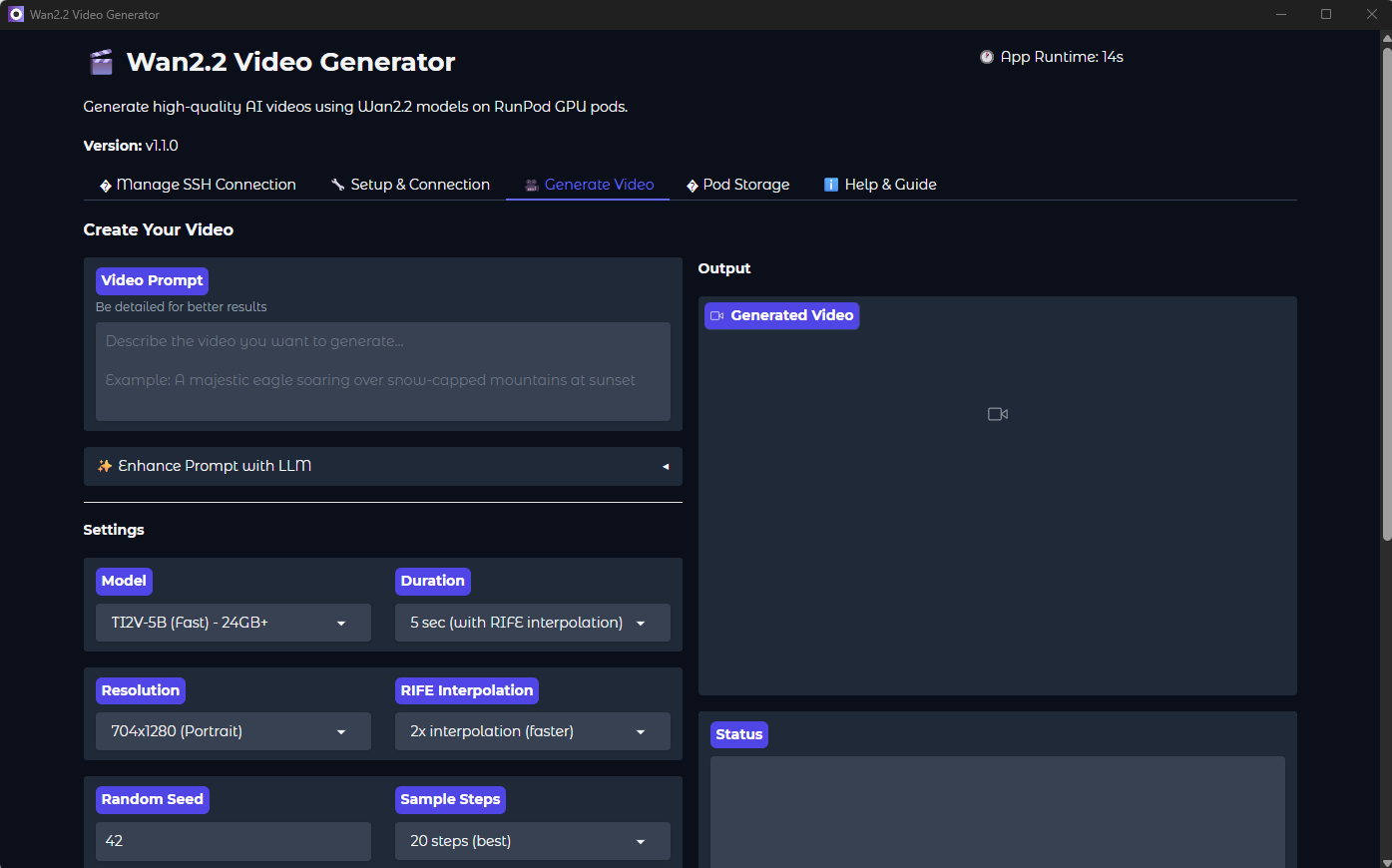
Generate AI Videos the Simple Way
Tired of wrestling with ComfyUI node graphs just to generate a single AI video? Wan2.2 Video Generator provides a clean, straightforward interface for creating stunning AI videos using the powerful Wan2.2 models—without touching a single node.
This desktop application connects to your RunPod GPU pod via SSH and handles everything: model management, video generation, frame interpolation, and seamless video stitching. Just enter a prompt and click generate.
Watch the Tutorial
See how to set up and use Wan2.2 Video Generator:
Download
Choose the installer for your operating system:
macOS Users: Currently building from source is required. See the GitHub repository for instructions.
Current Version: v1.1.0 | View all releases
The Problem with ComfyUI for Video Generation
ComfyUI is powerful, but for video generation it presents challenges:
- Steep learning curve - Understanding node connections takes time
- Complex workflows - Video generation requires many interconnected nodes
- Manual model management - Downloading and placing models correctly
- No built-in video stitching - Creating longer videos requires custom setups
- Debugging difficulty - When something fails, finding the issue is tedious
Wan2.2 Video Generator solves these problems by wrapping the Wan2.2 model in a simple GUI that handles the complexity for you.
Key Features
🎯 Simple Prompt-Based Generation
Just describe what you want. No nodes, no graphs, no configuration files. Enter a text prompt, select duration and quality settings, and click generate.
🧠 GPU-Aware Model Selection
The app automatically detects your GPU’s VRAM and shows only viable models. It pre-selects the best quality/speed tradeoff for your hardware.
📥 Lazy Model Loading
Models are downloaded only when you need them—not upfront. This saves bandwidth and storage while ensuring you always have the latest versions.
🎬 Seamless Video Stitching
Generate videos up to 10 seconds with automatic I2V (image-to-video) continuation. The app handles frame extraction, continuation prompts, and smooth transitions.
⚡ RIFE Frame Interpolation
Built-in RIFE integration doubles your frame rate for smoother motion. A 25-frame generation becomes 49 silky-smooth frames.
🖥️ Cross-Platform
Works on Windows, Linux, and macOS (source build). One consistent experience across platforms.
How It Works
1. Connect to your RunPod GPU pod via SSH
2. One-click setup installs Wan2.2 and all dependencies
3. Select model, resolution, and duration
4. Enter your prompt and click Generate
5. Video is processed and downloaded to your computer
Requirements
- RunPod Account: You need a GPU pod with SSH access
- SSH Key: For secure authentication to your pod
- GPU VRAM: Minimum 24GB for basic models, 40-80GB for high-quality
Recommended GPU Pods
| GPU VRAM | Available Models | Best For |
|---|---|---|
| 24GB (RTX 4090) | TI2V-5B | Fast testing, prototyping |
| 40GB (A100 40GB) | TI2V-5B, T2V-A14B | High-quality renders |
| 80GB (A100 80GB) | All models, all resolutions | Professional production |
Installation Guide
Windows
- Download the
.msiinstaller above - Double-click to run the installer
- Follow the installation wizard
- Launch “Wan2.2 Video Generator” from Start Menu
Linux (Debian/Ubuntu)
- Download the
.debpackage above - Install via terminal:
sudo dpkg -i Wan2.2.Video.Generator_1.1.0_amd64.deb
sudo apt-get install -f  # Fix any dependencies
- Launch from your applications menu or run
wan2p2-gui
First-Time Setup
- Enter SSH Details: IP address, port, and path to your SSH key
- Test Connection: Verify you can reach your RunPod pod
- Run Setup: Click “Setup Wan2.2” to install dependencies (10-15 min)
- Start Generating: Go to Generate tab and create your first video
Tips for Best Results
- Be descriptive: Include subjects, actions, lighting, camera angles
- Mention style: Cinematography style, mood, atmosphere
- Test at 480P first: Quick iterations before high-quality renders
- Use consistent seeds: Same seed = reproducible results
- Enable prompt enhancement: Automatically adds quality keywords
Example Prompts
Cinematic Nature:
A majestic eagle soaring over snow-capped mountains at sunset, golden light reflecting off its wings, dramatic clouds, aerial cinematography
Character Animation:
A samurai warrior standing in a field of cherry blossoms, wind moving robes, petals floating, cinematic lighting, slow motion
Abstract Art:
Flowing liquid metal forming geometric shapes, iridescent colors, smooth continuous motion, dark background, macro photography
Source Code
This project is open source. View the code, report issues, or contribute:
GitHub: tech-microcosm/wan2p2-gui
Troubleshooting
Connection Issues
- Verify IP address and SSH port from RunPod dashboard
- Check that your SSH key matches the one configured in RunPod
- Ensure your pod is running (not stopped or terminated)
Out of Memory Errors
- Try a lower resolution (480P instead of 720P)
- Use a smaller model (TI2V-5B instead of T2V-A14B)
- Reduce video duration
Setup Failures
- Ensure your pod has internet access
- Check that the pod has sufficient disk space
- Try re-running the setup process
Wan2.2 Video Generator: Professional AI video generation, simplified.